ABB encode.exe static reverse engineering
This post examines an old .exe available on the ABB forums that encodes RAPID modules. It never makes any claims of encryption, for good reason. The encoding is unreadable to a human, but entirely reversible once loaded into an ABB robot controller, which is what made me interested in it in the first place. We will begin with a short preface, then dive into static reverse engineering, explain how the encoding works along the way, and unfortunately end with a note on why I can’t share a script to restore encoded modules.
The encoding is an additive stream cipher over a linear congruential generator key stream, with a seed derived from information in the output file name.
Preface
RAPID
On ABB robot controllers, RAPID is a high level programming language to effect movement, I/O, fieldbus communications, etc. It’s somewhat similar to structured text. It’s logically separated by a module, in which logic is run in either a proc if no return is needed, or a func if a return is needed. Variables are declared at the start of a local scope and must be the first thing inside that scope, a la pascal. That scope can be module level, or local to a proc or func. A var is a variable that lasts as long as the local scope does. A pers is a variable that when changed is written back to the RAPID module itself, i.e. a non-volatile variable. And a const is a read only value. Finally, comments are any line starting with an exclamation mark !.
Below is the sample RAPID code provided with the executable.
MODULE Closed1402(SYSMODULE,NOSTEPIN)
! closed module

PROC rTest()
	! test

	RETURN;
ENDPROC

ENDMODULE
encode.exe
Based on public forum discussion and an article by Erik Lindqvist, encode.exe seems to be a program integrators passed around to each other. It’s available on several posts on ABB’s own forum, which is where I acquired the binary for this reverse engineering effort.
encode.exe in the zip file has a modify date of 1999-08-12, and Lindqvist identifies it as being written for S4C+ or legacy mode IRC5 robot controllers. Since then, ABB has had 2 subsequent generations of RAPID encoding. The 2nd generation was never publicly released, and the 3rd generation “CD KeyMaker” was the latest available as of Lindqvist’s July 2026 article. CD KeyMaker is only available to select ABB partners and integrators as a software tool. If I interpret the key in KeyMaker to refer to a private key, it could suggest that CD KeyMaker possibly uses encryption. Unfortunately I do not have CD KeyMaker, so blind speculation and basic OSINT are all I can do.
Static reverse engineering
I used Ghidra 12 to perform the static reverse engineering. I performed the analysis on Linux, which can sometimes make Windows debugging trickier, but wasn’t a problem this time. I’ve labelled most of the variables, set the types, and omitted boring code for any screenshots in this post.
Reading the manual
The program doesn’t have many arguments, pass either a folder or a single file, and it will copy everything to a destination, encoding any RAPID modules as it does.
encode [options] sourcefile destfile
The manual offers the following options.
-e exclusively encoded files: Only add encoded files into the destfile, no copies of other files will be made.
-s syntax check: Make syntax check before encoding.
-r remove comment: Remove all comments before encoding. This option can not be used without -s.
-n NOVIEW: This option can not be used without -s.
entry
I began at entry and got a little bogged down in the C runtime startup of an old Windows console program. Once I familiarized myself with how that looks I started to dive into what I labeled the encode_main function. Most of the contents of entry are C runtime setup. Throughout, you’ll see those with a crt_ prefix, to differentiate from similarly named functions that were linked into the binary.
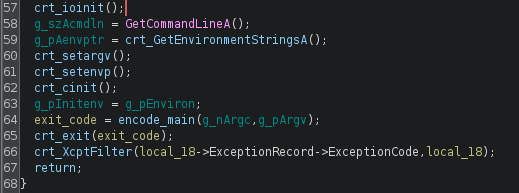
encode_main
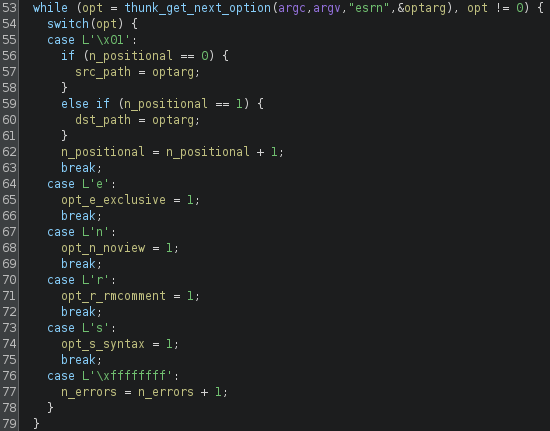
There were 4 options in the manual, and sure enough we see them parsed out here in encode_main. When an option is selected, a global variable is set to 1. Later code checks reference that global variable, typically to see if it’s 0.
Later in encode_main, there are 2 functions of interest, encode_init_pgm_runtime, and encode_walk_tree. With the luxury of a fully analyzed and labeled function, you can weigh the pros and cons of which of these two function calls should be examined in closer detail.
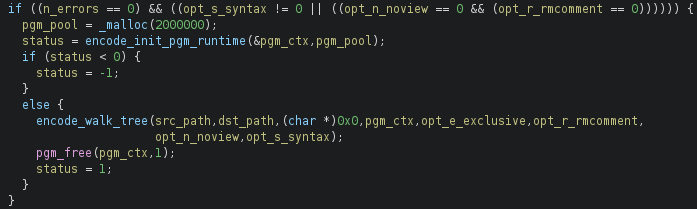
A 2MB heap buffer was too tempting to overlook, so I started to investigate the first function, later labelled encode_init_pgm_runtime. This turned out to be a mistake since it didn’t directly lead to the encode logic, and had many further function calls that seemed like they warranted investigation. In that rabbit hole I did find that functions starting with pgm seem to be how ABB refers to functions that deal with RAPID code execution, or custom program logic. Of the 718 exported functions, 96 start with pgmexe_, 78 start with pgmsym_, 70 start with pgminf_, 63 start with pgmobj_, etc. It seems as though some RAPID code was linked into the binary, likely intended to provide the syntax check with the -s option. This RAPID code context is initialized every time, to be used later. That would be an excellent next subject for further analysis, for now I pivoted and started looking through the function labelled encode_walk_tree.
encode_walk_tree
Much of the start of encode_walk_tree is the glob logic to walk a directory tree by a recursive function call. Later it checks found files for the extensions .mod, .sys, or .prg. If only a single file is passed, these extension checks are skipped and it’s always encoded.
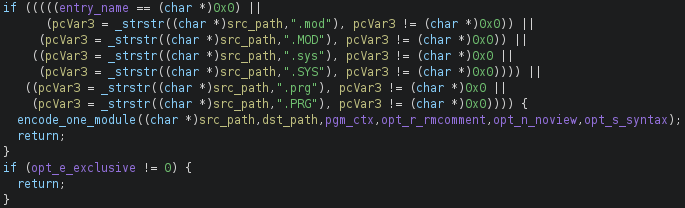
Keen eyed among you may notice that this isn’t a true file extension test, rather it’s a test for strings like .mod anywhere in the whole path. This means a path like /my.mod/stuff/a.txt would satisfy the check, despite being a .txt file.
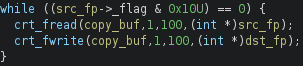
The default behavior, when -e is not used, is files that aren’t RAPID modules are copied to destfile. Interestingly this happens in 100 byte chunks, which could contaminate the ends of files with the contents of the last chunk, which would likely be contents from earlier in that same file. I haven’t verified this with dynamic analysis however.
encode_one_module
encode_one_module is an exciting function, it’s where the logic starts to become specific to encoding, rather than dealing with console logic or walking the directory. The first thing it does is branch based on if the -s syntax check option is set. This is where the pgm context from way back in encode_main starts to get used. I’ll only go into detail on the default branch that doesn’t syntax check, since it still involves the encoding process.
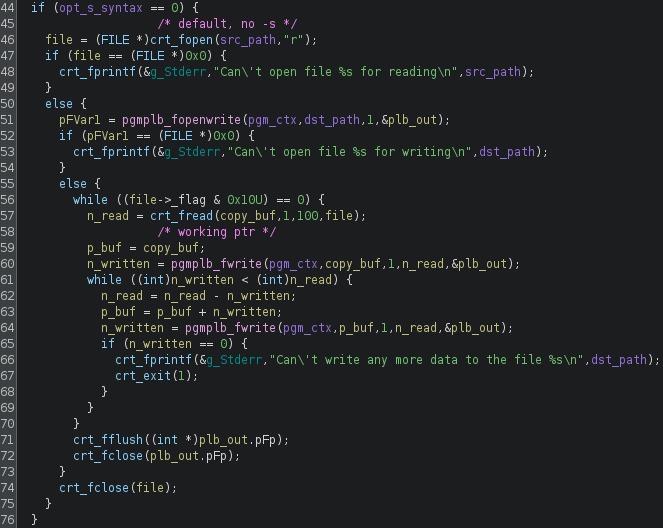
Three things happen here, broadly.
- There’s a function call to
pgmplb_fopenwrite. This function creates thepgmplb_handle *to which the output is written. This function call also sets the key (more on that later). - Loop and
freadinto a buffer, 100 bytes at a time until EOF. - Call
pgmplb_fwriteto encode and write out the 100 byte buffer to the handle, then go back to step 2 until EOF.
One caveat here that derailed me for a moment is the fopen at the start that creates the file pointer to read the contents of a module. When you fopen in r mode as opposed to rb mode, a 2 character CRLF is read as a single LF. If you fail to account for that, the key stream and plaintext stream can become out of sync with each other.
struct pgmplb_handle
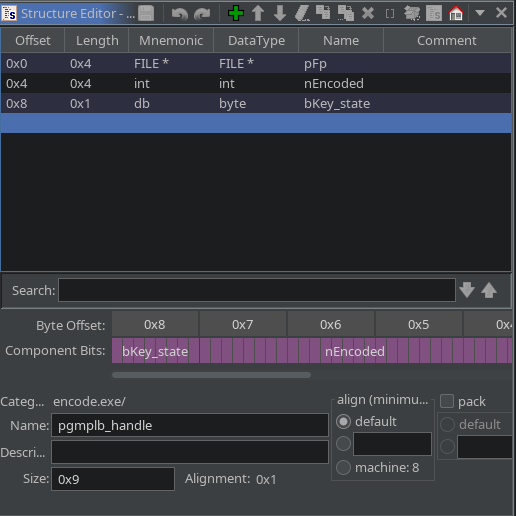
Let’s take a quick look into pgmplb_handle, since we start to encounter it in encode_one_module and again in pgmplb_fopenwrite. The purpose of this struct is to hold information about the file we write encoded and unencoded data to.
pFpis a FILE pointer we write out tonEncodedis 0 if not encoding, and 1 if encodingbKey_stateis the current byte that represents the key state, more on that later
pgmplb_fopenwrite & file format
The main purpose of this function is to set up the pgmplb_handle struct, and write the header to an encoded file. If we’re encoding, fopen as binary in write mode, and if we’re not encoding, fopen as text in write mode. It also stores the encode_flag parameter and initial key state in the pgmplb_handle.
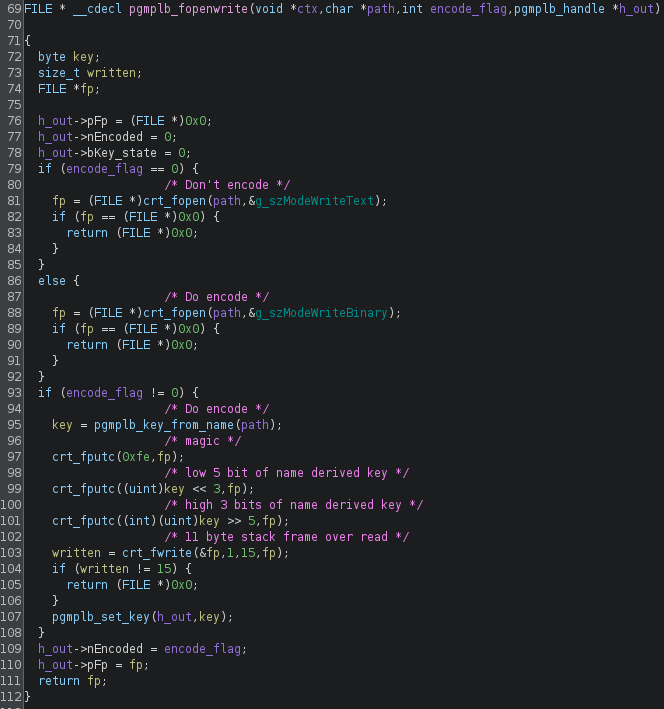
The encoded file always starts with 0xFE, a magic byte. Then the key is split weirdly, the low 5 bits, then the high 3 bits. The crt_fwrite function call emits the FILE *fp (4 bytes), and 11 bytes of stack data, which is likely a bug. During decoding these 15 bytes are skipped, so they can be replaced with zeroes if reimplementing the encode function elsewhere.
Here’s the rough shape of the 18 byte header, including the stack leak:
0xFE | (key << 3) & 0xFF | key >> 5 | fp | saved EBP | saved EIP | 3 low bytes of ctx*
If we hexdump an encoded module, we can see that header and analyze it.
00000000  fe f8 01 a0 3d 52 00 4c  f9 18 00 b0 16 40 00 7c  |....=R.L.....@.||
00000010  02 44 77 c0 88 e8 5a 6a  28 ea 1e 08 ff e0 7a fe  |.Dw...Zj(.....z.|
00000020  04 3f 6c e9 27 bc 71 c2  e7 bb 17 35 61 77 74 6c  |.?l.'.q....5awtl|
00000030  b3 33 8f 61 ad 81 57 cf  49 67 35 a5 1b 8e 9b d1  |.3.a..W.Ig5.....|
00000040  10 1c c9 c5 69 6f a3 1f  c2 67 34 d8 7f 0b b8 11  |....io...g4.....|
00000050  e5 f2 de d9 ad dd 57 86  68 5b 57 4c 40 c5 60 16  |......W.h[WL@.`.|
00000060  62 94 ce 56 66 f1 99 bf  1d 05 46 79 ae da a9 67  |b..Vf.....Fy...g|
00000070  aa 64 d8 95 f1 c2 b2 5a  b4 cc                    |.d.....Z..|
0000007a
The key can be recovered first, enc[1] >> 3 | enc[2] << 5, which comes out to 63. We’ll check that later against the output file name logic. If we also recover the stack leak, that yields 0x00523DA0 as the saved fp, 0x0018F94C as the saved EBP, 0x004016B0 as the saved EIP, and 0x??44027C as the ctx pointer (because it’s the first arg passed to the function).
Stack leak
This is likely a just bug, but I spent a while trying to figure it out, so it’s in the writeup.
Let’s objdump the headers to see where they are in virtual memory. This binary predates ASLR, so I can take some liberties with my assumptions about where the stack is.
> objdump -h ./encode.exe

./encode.exe:     file format pei-i386

Sections:
Idx Name          Size      VMA       LMA       File off  Algn
  0 .text         000f6920  00401000  00401000  00001000  2**2
                  CONTENTS, ALLOC, LOAD, READONLY, CODE
  1 .rdata        00023034  004f8000  004f8000  000f8000  2**2
                  CONTENTS, ALLOC, LOAD, READONLY, DATA
  2 .data         0000d000  0051c000  0051c000  0011c000  2**2
                  CONTENTS, ALLOC, LOAD, DATA
  3 .idata        00000f68  0052a000  0052a000  00129000  2**2
                  CONTENTS, ALLOC, LOAD, DATA
  4 .reloc        00005dd9  0052b000  0052b000  0012a000  2**2
                  CONTENTS, LOAD, READONLY, DATA
There are 4 pointers in the stack leak, let’s sort out where they all are in memory and check if that makes sense.
- fp at
0x00523DA0indicates it’s in the .data section, which is plausible for a pointer to a handle. - EBP at
0x0018F94Cis a bit unusual for a stack location, but in the realm of possibility - EIP at
0x004016B0lands it in .text, makes perfect sense - arg0, the RAPID ctx pointer, is at
0x??44027C. Can’t know where it is for sure because we’re missing a byte. The 3 known bytes rule out .data, .rdata, .idata, and .reloc. That leaves .text, which is unlikely. Instead my guess is that it’s on the heap somewhere.
That leaves me feeling pretty confident that this is a real stack leak. That’s based on what was observed in static reverse engineering, then double checking with analysis of the leaked stack info in the encoded file.
pgmplb_key_from_name
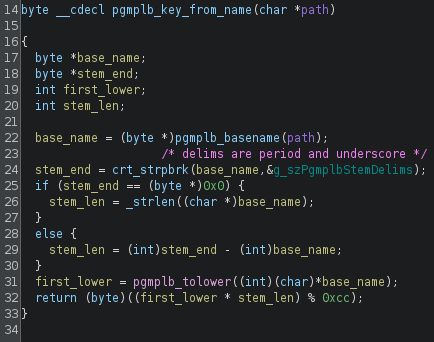
Another juicy sounding function, this one derives the initial key state from the output file name. First it gets a base name from the path. A base name is just the file part, without any preceding folder information. Then it gets a stem from the base name, the stem is all the text up to the first period . or underscore _ character. Then it gets the lowercase value of the first letter of the base name. Interestingly, it does that by a LUT. The last piece is the length of the stem. It combines those with the following logic:
key = (lower(base[0]) * len(stem)) % 0xCC
Let’s apply it to the given example file name, Closed1402Enc.sys. The first character is capital C, we get the ordinal of the lowercase c, which is 99. Then the length of the stem part, which is Closed1402Enc, is 13 characters.
key = (99 * 13) % 0xCC = 63
This is consistent with what we saw in the hexdump.
Closing out pgmplb_fopenwrite
If you’ve been following in order, we jump all the way back up to encode_one_module now, finishing with the logic we were analyzing in pgmplb_fopenwrite. Now that we’ve opened our handle and established the initial key state based on the output file name, we can begin the encoding process.
pgmplb_fwrite
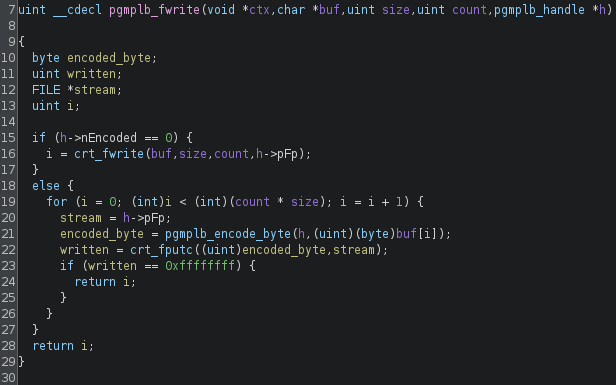
pgmplb_fwrite branches first, to write unencoded if h->nEncoded is 0. Otherwise if we are encoding, just get the output stream, get the next encoded byte, and write it, all in a loop.
pgmplb_encode_byte
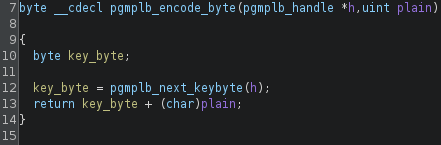
This function is what makes it an additive stream cipher. It combines the plaintext stream with the “secret” PRNG stream using addition.
pgmplb_next_keybyte
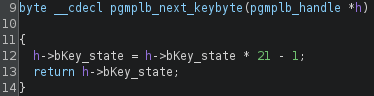
The last piece of the puzzle, the PRNG. This is specifically a linear congruential generator, or LCG. The LCG uses 3 parameters, the multiplier is 21, the increment is -1, and the modulo is 256 by a byte cast.
Conclusion and legality
The functionality of this executable can be recreated and reversed, and as such I’ve developed a script to do both. However upon review of copyright law, I believe I cannot share it as 17 U.S.C. § 1201(b) states:
No person shall manufacture, import, offer to the public, provide, or otherwise traffic in any technology, product, service, device, component, or part thereof, that has only limited commercially significant purpose or use other than to circumvent a technological measure that effectively controls access to a work protected under this title